
Why the Medicare App Matters for Your Health Coverage
The medicare app known as “What’s Covered” is the only official U.S. government Medicare mobile app — and it gives you instant answers about what Original Medicare will and won’t pay for, right from your phone.
Here’s what you need to know at a glance:
- What it is: A free app from the Centers for Medicare & Medicaid Services (CMS)
- What it does: Lets you search or browse coverage details for Medicare Part A and Part B
- Who it’s for: People on Original Medicare, their caregivers, and family members
- Where to get it: Free on the Apple App Store and Google Play
- What it does NOT cover: Medicare Advantage plans, Medigap, or Part D drug plans
If you’re approaching retirement, Medicare can feel like a maze. Millions of people have the same questions: Will Medicare pay for this test? What will I owe out of pocket? Is this service even covered?
Those questions are not small. A wrong assumption can lead to a surprise medical bill.
That’s exactly why CMS built the “What’s Covered” app. According to CMS data, Medicare’s coverage-related content draws around 15 million page views per year on Medicare.gov, and 1-800-MEDICARE fields over 3 million coverage-related calls annually. Clearly, people need fast, reliable answers — and the app was designed to deliver them.
With 100K+ downloads and a growing Medicare population expected to reach over 80 million beneficiaries by 2030, this tool is becoming more relevant every year.
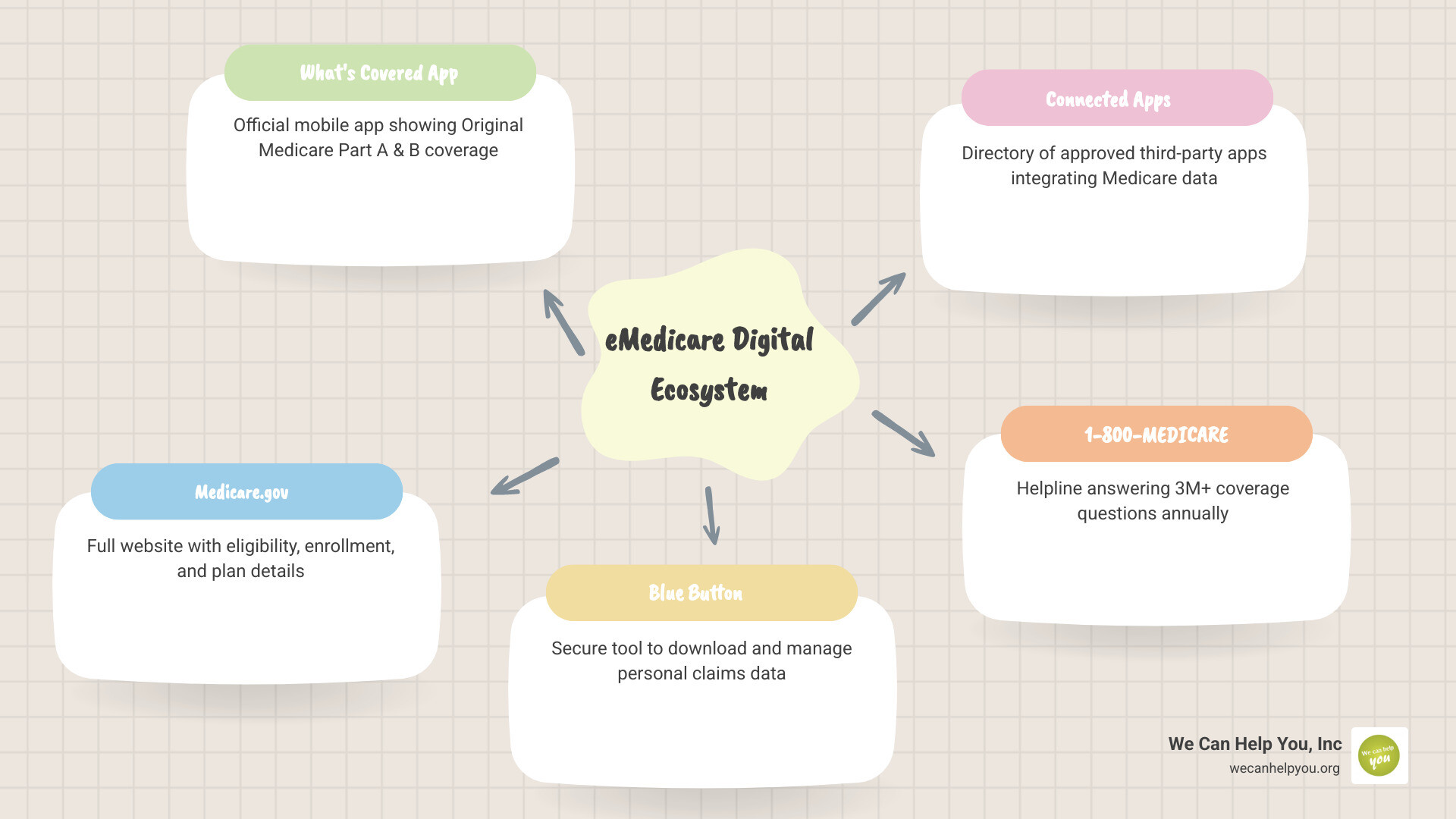
Navigating the Official Medicare App: ‘What’s Covered’
When the Centers for Medicare & Medicaid Services (CMS) launched the “What’s Covered” app, it marked a major milestone in the eMedicare initiative. This initiative was designed to modernize the way we interact with our health benefits, moving away from thick paper handbooks and toward real-time digital solutions.
The primary purpose of this medicare app is simple: to provide a quick, authoritative answer to the question, “Is my item or service covered?” Whether you are standing in a doctor’s office in Phoenix, Arizona, or consulting with a specialist in Albany, New York, you can pull out your smartphone and get an answer in seconds.
As outlined in the official announcement, New App Displays What Original Medicare Covers, the tool is specifically tailored for those using Original Medicare. It has already seen over 100K+ downloads, reflecting a significant shift in how beneficiaries manage their health. In fact, as of 2016, roughly 65% of Medicare beneficiaries were using the internet daily, a number that has only grown as more “tech-savvy” seniors enter retirement.

Features and Coverage Details
The “What’s Covered” app focuses on the core of the program: Original Medicare. This includes Part A (Hospital Insurance) and Part B (Medical Insurance).
When you open the app, you can browse through a general list of services or use the search bar to find a specific item. One of the most valuable features is the emphasis on preventive services. Medicare covers many screenings and tests at no cost to you, and the app makes it easy to see which ones you’re eligible for.
For more detailed guidance on how this fits into your overall plan, you can visit our page on medicares-whats-covered-app.
Here are some specific items you can check:
- Preventive Screenings: This includes mammograms, cervical cancer screenings, and bone mass measurements.
- Diabetes Management: You can quickly verify if Medicare will pay for diabetes supplies like glucose monitors or test strips.
- Medical Equipment: Check coverage for walkers, wheelchairs, or CPAP machines.
- Outpatient Services: See what Part B covers regarding doctor visits and lab tests.
Comparison of Coverage in the App
| Feature | Medicare Part A (Hospital) | Medicare Part B (Medical) |
|---|---|---|
| Primary Focus | Inpatient stays, skilled nursing, hospice | Doctor visits, outpatient care, DME |
| Preventive Care | Limited | Extensive (Flu shots, screenings, etc.) |
| Searchable in App | Yes | Yes |
| Cost Info Provided | Deductibles and Copays | Coinsurance (usually 20%) |
Understanding the Limitations of the Tool
While the medicare app is incredibly helpful, it isn’t a “one-stop shop” for every single person. It is a specialized tool with specific boundaries.
Why the medicare app focuses on Original Medicare
The biggest “gotcha” for many users is that the app does not include information for Medicare Advantage (Part C), Medigap (Supplement), or Part D (Prescription Drug) plans. Because Advantage plans are run by private companies, their coverage rules and networks vary wildly. If you live in a city like Charlotte, NC, or Las Vegas, NV, and you have a private Advantage plan, the “What’s Covered” app might tell you a service is covered by Original Medicare, but your specific plan might have different rules or lower costs.
Furthermore, the app does not support:
- CPT Codes: You cannot search by the specific five-digit medical codes your doctor uses.
- Local Coverage Determinations: Some services are covered differently based on where you live, and the app focuses on national standards.
- Surgery Costs: The app won’t give you a quote for a specific surgery or procedure at a specific hospital.
Cost transparency and the medicare app
Understanding your financial responsibility is a key part of the eMedicare mission. The app provides general information on copayments, coinsurance, and deductibles. For example, it will remind you that for most Part B services, you are responsible for 20% of the Medicare-approved amount after you meet your deductible.
However, it won’t show your personal claims history or how much of your deductible you have already met for the year. For that level of personalized detail, you should visit Welcome to Medicare | Medicare to log into your secure account.
Technical Access and User Experience
Downloading the medicare app on iOS and Android
Getting the app on your device is straightforward. It is available for both major platforms:
- Android Users: You can find the app at What’s covered – Apps on Google Play.
- iPhone/iOS Users: Download it from the What’s covered on Apple App Store.
One of the best technical features is offline access. Once you download the app, you don’t need a 5G or Wi-Fi connection to browse the coverage list. This is perfect for hospitals or doctor’s offices with poor cell reception. Additionally, there is a Spanish version available (search for “Qué está cubierto”), and the app will automatically switch languages if your phone’s settings are set to Spanish.
User reviews and search functionality
The app currently holds a 3.6-star rating on Google Play and a 3.1-star rating on the Apple App Store. While users appreciate the convenience, reviews highlight some areas for improvement.
Common feedback includes:
- Search Terms: Some users find the search function a bit “picky.” For example, searching for medical shorthand like “TSH” or “HbA1c” might not always yield results compared to typing out “Thyroid” or “Diabetes.”
- Navigation: Users enjoy the “Preventive Services” list, which clearly shows what is covered at $0 out-of-pocket.
- Feature Requests: Many beneficiaries have expressed a desire to “favorite” or save certain services for later reference.
Privacy and the Blue Button Initiative
We know that privacy is a top concern when it comes to medical data. The official medicare app follows strict Privacy Policy guidelines. According to the developer (CMS), the app does not share data with third parties. While some usage data is collected to improve the app, it is not linked to your personal identity.
The “What’s Covered” app is just one part of the broader Blue Button 2.0 initiative. This program allows you to securely connect your Medicare claims data to other third-party “Connected Apps.” These apps can help you:
- Share your health history with a new doctor.
- Keep a list of your medications in one place.
- Participate in clinical research.
You can explore these third-party tools in the Medicare Connected Apps Directory. Just remember: while “What’s Covered” is a government app, “Connected Apps” are created by private companies. Always check their privacy settings before sharing your data!
Frequently Asked Questions about Medicare Digital Tools
Why can’t I find my Medicare Advantage plan on the app?
The “What’s Covered” app is strictly for Original Medicare (Parts A and B). If you have a Medicare Advantage plan (like an HMO or PPO), you should check if your specific insurance provider has their own app. Most major carriers in states like Florida, Texas, and Ohio offer their own mobile tools to track your specific benefits and network providers.
Does the app work without an internet connection?
Yes! One of the standout features of the medicare app is its offline functionality. Once the app is installed, the basic coverage information is stored on your phone, so you can use it even in the “dead zones” of a large medical center.
How do I know if an app is the official government version?
Always look for the developer name. The official app is developed by the Centers for Medicare & Medicaid Services. Be wary of apps with similar names that ask for a credit card or your Social Security number—the official “What’s Covered” app is free and does not require you to log in to see general coverage rules.
Conclusion
At We Can Help You, Inc., we believe that education is the most powerful tool you have for a successful retirement. Whether you are navigating the streets of Chicago, Illinois, or enjoying the sun in Scottsdale, Arizona, having the right information at your fingertips can save you thousands of dollars in medical costs.
The medicare app is a fantastic first step in taking control of your healthcare. By understanding what is covered under Parts A and B, you can have more informed conversations with your doctors and avoid unexpected bills.
To help you even further, we offer a free Medicare Planning Guide and a free Social Security maximization report. Our goal is to help you increase your retirement income and reduce your stress. For More info about medicare app services and to see how we can help you plan your future, visit our website today. We are here to help you navigate the complexities of Medicare and Social Security so you can focus on enjoying your retirement!